


Home/Software/Hoxlyn Video

Available

Hoxlyn Video logoHoxlyn Video

Drop in a raw talking video and get back a finished short: captions, motion graphics, sound effects and mastered sound, edited by AI on your own computer. Clean the voice, cut the pauses and smooth the cuts on a professional timeline, then press Start AI Editing.

Windows may show “Windows protected your PC” because our installer is not code-signed yet. Click More info, then Run anyway.

Version0.1.2
Download456 MB
PlatformsWindows 10/11 (64-bit)
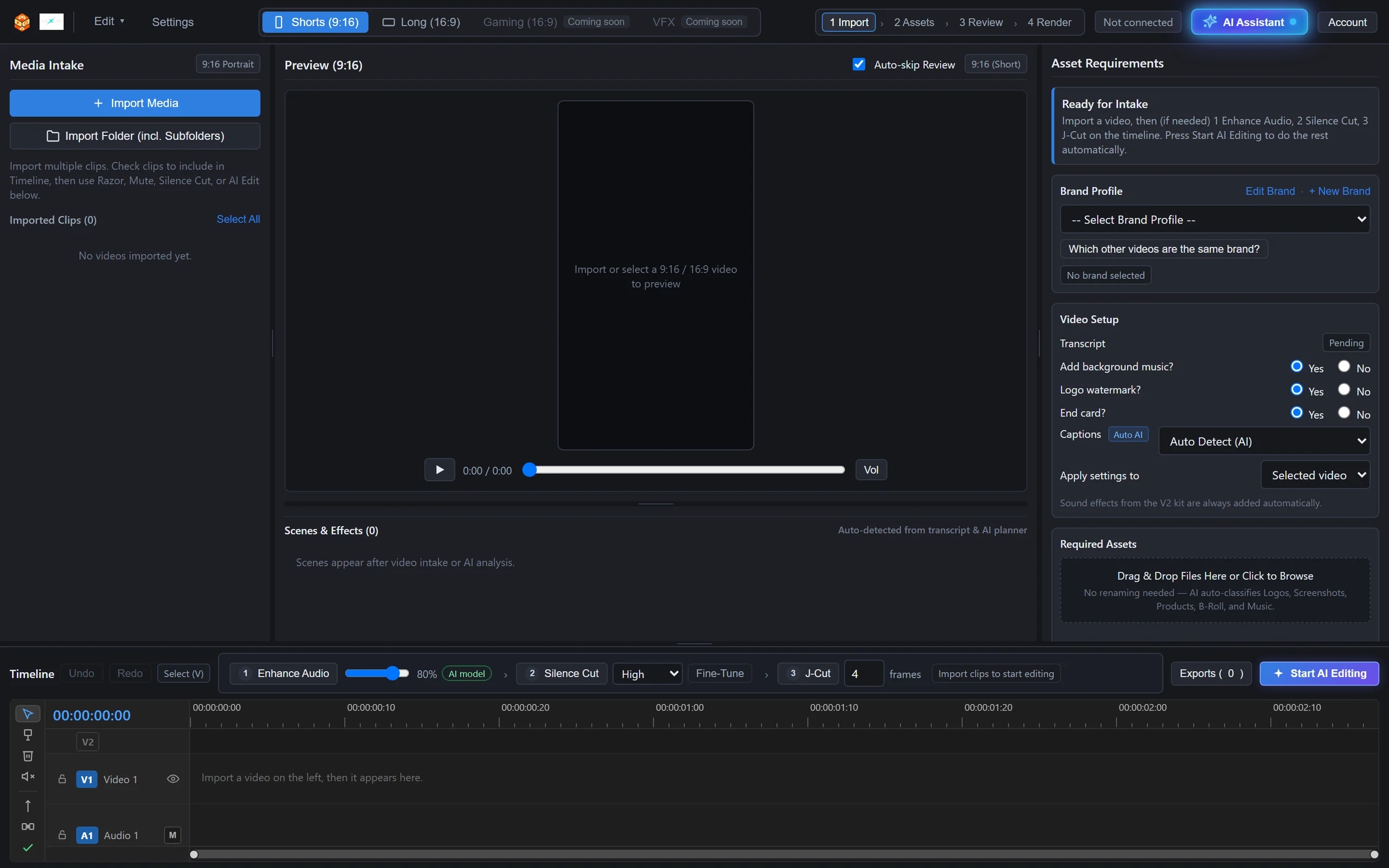
The Hoxlyn Video workspace: media on the left, preview in the middle, brand and video setup on the right, timeline at the bottom

01 Releases

What’s new.

0.1.2 · Windows · 17 November 2026

- Your videos carry only your own brand: the app no longer comes with other brands, and Template 1 no longer ends on another company's logo. Add your logo, colour and website in a brand profile; "Logo watermark" and "End card" now do what they say. - Calmer Template 1: title cards fade in and out instead of sliding across the screen. - Finished videos play inside the app (Play, Open in video player, Show in folder). - New up/down bar beside the audio meter: drag to scroll the tracks, drag its ends to make every track taller or shorter, double-click to fit. - Template editing rules now come from Hoxlyn with each edit. - Everything from 0.1.1 (the AI Editing queue and the timeline fixes).

0.1.1 · Windows · 17 November 2026

- Add up to 10 videos to a queue and edit them in one go. Each video is saved to your export folder under its own name. - The queue waits for you: reorder, edit or remove videos before you start, and stop after the current one at any time. - If your editing time runs out, the queue pauses instead of failing; buy more minutes and press Resume. - A video that fails shows why and can be retried; the next one keeps going, and the time it held comes back. - Enhance Audio and Silence Cut only touch the parts you kept. - Sound in the preview. - Select many clips by dragging. - Space plays and pauses. - Export is at the top (Ctrl+M). - AI Editing keeps the cuts you already made.

02 Getting started

Up and running in minutes.

01

Import

Drag your videos in: MP4, MOV, MKV, WebM and more. Phone videos in HEVC are converted for preview automatically, and 9:16 or 16:9 is detected by itself.

02

Enhance Audio (optional)

A built-in AI voice model removes background noise from the voice. It works offline; nothing is uploaded for this step.

03

Silence Cut (optional)

The pauses in the speech are found and cut out. Every kept part becomes its own clip on the timeline, so you can still check and change it. Fine-Tune keeps any pause you want.

04

J-Cut (optional)

Each clip's sound starts a few frames before its picture, the way professional editors smooth a cut.

05

Start AI Editing

One button does the rest: it closes gaps on the timeline, applies the cuts, transcribes the audio word by word in any language, asks once about missing files, then plans the edit, renders the video, masters the sound and checks the quality.

06

Exports

Play or download the finished video, open its quality sheet, or ask for changes in plain words with Review / Revise.

03 How it works

In detail.

01

A professional timeline

The real audio waveform is drawn from the actual sound (stereo shows two channels), so you can see exactly where the speech and the pauses are. A timecode ruler, track headers with lock, show/hide and mute, and adjustable track height.

Zoom from the whole video down to single frames: drag the round ends of the scroll bar, use Alt + mouse wheel, or = and -; \ fits everything. Razor, delete, mute, split at the playhead, undo and redo, and drag clips. Gaps are marked and closed automatically before editing, and the preview always keeps the video's shape, never stretched or cropped.

02

AI that edits line by line

Every word is transcribed with its exact time, in many languages including Bangla, English and Hindi. Captions can be in the spoken language, in English, or in a language you type.

For each line the AI decides the caption style, the highlighted key word and the motion graphics, and places text so it never covers the face. Before posting, you get suggestions for the title, caption and hashtags.

03

Brand profiles and assets

Save a brand's logo, colour, website, end card and rules (such as blurring prices or e-mails) once, and reuse them for every video of that brand. Choose which videos belong to the same brand.

Drop in logos, screenshots, product photos, b-roll or music without renaming anything: the AI recognises what each file is. For each video you answer a few yes/no questions: background music, logo watermark, end card and captions.

04

Sound and a quality check

Sound effects come from a professional kit, and the sound is mastered to -14 LUFS.

Every video is checked before you get it: frame rate, size, motion at the start and end, no long silences, peak level, and a price and e-mail check, plus a contact sheet. Want a change? Ask in plain words, like "make line 3 bigger", and only that part is rebuilt.

05

Your account and editing time

Connect the app to your Hoxlyn account once: sign in with Google on hoxlyn.com and press Allow. There is no password inside the app.

Editing time is counted in minutes of the finished video, and a failed edit gives the time back. The time you have left is always shown in the app.

06

Privacy and protection

Your videos are edited and rendered on your own computer. The AI editing engine is delivered encrypted for each edit and removed from the computer right after, and AI service keys never reach the app. Uploaded working copies are cleaned automatically.

Pricing

Prices for Hoxlyn Video.

Full pricing page

Free

Free

Free download · first 30 seconds of one video

Best forTrying it on your own video before you buy.

  • Download Hoxlyn Video free
  • Edit the first 30 seconds of one video, free
  • No card needed
  • Once per account and per PC
Download free

Studio

Best value
$200one-time

For Hoxlyn Video only

8.3 hours (500 minutes)

Counted by the length of the finished video

Never expires

Best forAgencies, teams and busy channels.

  • 500 Reels or Shorts of 1 minute each
  • or 1,000 Reels of 30 seconds
  • or 50 YouTube videos of 10 minutes
  • About 16 one-minute Reels a day for a month
  • Save 58% compared with buying minute by minute
Buy Studio

Any number of minutes

$0.95 per minute

Need just a little more? Buy exactly what you need: 1 extra minute, 10, or 1,000. The minutes are added to your account at once.

For Hoxlyn Video only · one-time · never expires.

Buy 60 minutes

Total $57

04 Requirements

What you need.

Windows
Windows 10 or 11, 64-bit
Mac
Apple Silicon version planned
Internet
Needed for AI editing (sign-in, transcription, the editing engine). Enhance Audio and Silence Cut work offline.
Account
Hoxlyn account (sign in with Google)
Formats
Shorts (9:16) and Long (16:9)

05 Questions

Good to know.

How is editing time counted?

In minutes of the finished video. If an edit fails, the time is given back. The time you have left is always shown in the app.

Are my videos edited on my computer?

Yes. Your videos are edited and rendered on your own computer. AI editing needs an internet connection for sign-in, transcription and the editing engine, and uploaded working copies are cleaned automatically.

Which languages work?

Transcription works in many languages, including Bangla, English and Hindi. Captions can be in the spoken language, in English, or in a language you type.

Is there a Mac version?

The current build is for Windows 10 and 11, 64-bit. A version for Mac with Apple Silicon is planned.

Does one purchase cover other Hoxlyn products?

No. Each Hoxlyn product is bought separately.